
fb777 Register: Your Philippines Sign-Up Guide
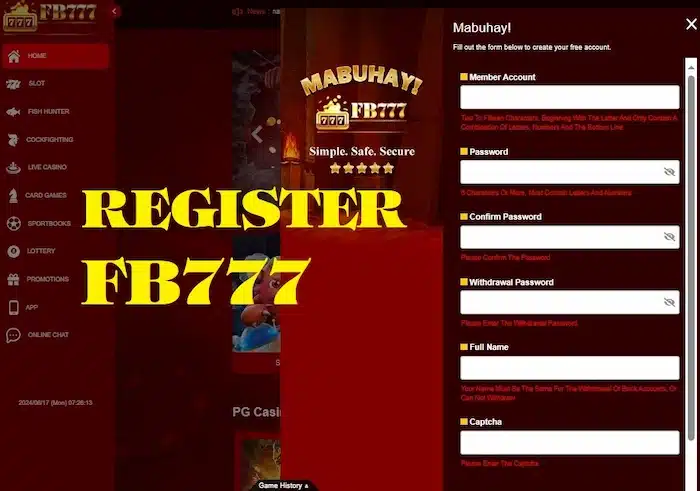
To register with fb777, use a sign-up address you have verified, provide your own accurate details and complete the checks requested by the service. This guide explains what to prepare, how mobile verification works and what to do when registration fails. The form shown here is a preview, not a live account-opening service.
Explore the sign-up form
Preview only: do not enter real personal details or passwords. No account is created and no SMS is sent. Already registered? Read the login guide.
How to register in 4 steps
Use this sequence on the verified service, following its current instructions. Registration, contact verification and approval for account features are separate steps. A completed form does not automatically confirm eligibility, unlock withdrawals or entitle you to a bonus.
Enter accurate registration details
Check the full website address, then complete the fields requested by the live form. Use your own name and contact details. Follow its password requirements and review the terms before submitting.
Verify your mobile number or email
If a code or confirmation link is requested, use the contact method attached to your application. Enter a code only on the page that issued the request. Never give it to a chat contact claiming to activate your account.
Complete the required profile checks
Confirm the name, date of birth and other information requested for eligibility. Additional identity checks may apply. If payment details are needed later, check the account-holder requirements before adding them.
Review your account before using it
After approval, check the profile and any outstanding verification notices. Read game rules, payment limits and promotion conditions before participating. Set time and spending limits rather than rushing into a deposit.
fb777 registration requirements and checks
Preparing your details helps avoid duplicate applications, verification delays and account-recovery problems. The information below explains the fields in this page’s sign-up example. The live service may request different fields or further checks; use its current notice to understand what is required and why.
What do I need before registering?
Have access to the contact methods you intend to register. Do not use another person’s information to avoid a restriction or speed up verification.
- Your mobile number: use a number you control and can receive messages on. If a country-code field already shows +63, do not enter that prefix again. Follow the live form’s example for the remaining digits.
- Your email address: check its spelling and make sure you can access the inbox. Email requirements depend on the actual form.
- Your full name: enter it consistently with the identity documents requested for verification, including any relevant name fields the form provides.
- Your date of birth: provide the real date if requested. Do not alter it to bypass age or eligibility checks.
- A unique password: follow the current service requirements and avoid reusing an email or payment-account password. The preview strength indicator is a simple guide, not a security assessment.
Do I need a referral code? The example form has an optional field. On the actual service, check whether a code is optional and what offer, if any, it links to. Leave an optional field blank if you do not have a code. Do not invent one or pay an agent who promises guaranteed approval or rewards.
Why do age and identity checks matter?
Account creation is limited by the applicable age, location and eligibility rules. A checkbox does not replace verification, and this guide does not establish that the service is available or authorised for every reader in the Philippines. Only proceed if you meet the relevant requirements. Read the responsible gaming guidance; do not share an account with a child or anyone who is not eligible.
How can I protect my information during sign-up?
Check the address before entering personal information, and stop if the browser shows a certificate warning. A padlock alone is not proof of the operator’s identity. Read the privacy policy before uploading identity documents. Send documents only through an explained, verified process. Keep passwords, OTPs and wallet PINs out of support messages; this guide does not certify the site’s security systems.
What should I do after registration?
Check that your profile is correct and find out whether further verification is pending. Use the fb777 login guide if you need help returning to your account. Before making a payment, review the selected method, amount in PHP, charges and withdrawal requirements. Compare any welcome offer with its complete terms. Registering an account is not evidence that a bonus is active, a payment method is available or every game is unlocked.
Avoid duplicate accounts: If your mobile number or email is already registered, try account recovery or contact the verified support channel. Check the current account rules instead of creating another account to get around an error or claim an offer twice.
Check bonus terms before opting in
This guide does not confirm a live welcome package. If an offer appears in your account, check its eligibility, claim process, wagering rules and expiry. These are five offer types to review, not guaranteed benefits of signing up.
- First-deposit bonus: qualifying amount and wagering terms
- Free spins: eligible titles, value and expiry
- Referral offers: code rules and qualifying actions
- Loyalty points: earning and redemption conditions
- Cashback: calculation period, caps and exclusions
fb777 register FAQs
Six account features to review
Welcome offers
Check whether an offer is actually available to your account. Read the claim process, wagering conditions and deadline before accepting; registration alone does not promise a reward.
Account protection
Review security settings and additional verification options where available. Keep your registered contact method secure and avoid saving credentials on shared devices.
Access after verification
Check for outstanding account checks before using the lobby. A successful form submission is not the same as full account approval or unrestricted access.
Mobile access options
Review the fb777 app guide before installing a file. Confirm the source, operating-system requirements and account compatibility rather than trusting a download sent in a message.
Payment methods and limits
Use only methods listed in the verified cashier. Do not assume GCash or Maya is supported unless shown for your account. Review PHP amounts, fees and processing information.
Support and request records
Use the contact channel displayed by the verified service, and keep a case reference for unresolved issues. Response times and support hours must be checked there.